Blog

Bible Microformats

Sean from Blogos proposes a microformat for marking up Bible references on the web.

About Microformats

Microformats are a way of marking up semantic data in HTML without inventing new elements or attributes. For example, here’s how you might mark up geographic coordinates:

<div class=“geo”>GEO: <span class=“latitude”>37.386013</span>, <span class=“longitude”>-122.082932</span></div>

In this way, computer programs can figure out without any ambiguity that the above sequence of numbers refers to latitude and longitude. Browsers, for example, might automatically link the coordinates to Google Maps or your mapping application of choice. Firefox 3 is evolving along these lines.

Bible Microformat

I’ve been thinking for a while about the best syntax to use for a Bible microformat. The problem I kept running into was in coming up with the One True Representation of a Bible verse (i.e., is it “John 3:16” or “Jn 3:16” or “John.3.16” or something else).

Sean neatly sidesteps the problem with a “good enough” solution. He proposes a format akin to the following:

<abbr class="bibleref" title="John 3:16">Jn 3:16</abbr>

The crucial aspect is that it doesn’t matter exactly how you specify the Bible verse—once you do the hard part of indicating that a string of text is a verse reference (the class="bibleref"), any decent reference parser should be able to figure out which verses you mean. It’s so simple it’s brilliant.

Now let’s push it a little further.

I suggest that the microformat should take advantage of the underused and, in this case, semantically more meaningful <cite> tag rather than the <abbr> tag. You are, after all, citing the Bible.

<cite class="bibleref">John 3:16</cite>

However, you also have to account for people who link the verse to their favorite online Bible. You could double-up the tags:

<a href="…"><cite class="bibleref">John 3:16</cite></a>

But it’s messier than need be. Since the practice of linking is widespread, why not overload the <a> tag with the appropriate class:

<a href="…" class="bibleref">John 3:16</a>

Both <cite> and <a> have a title attribute in which you can place a human- (and machine-) readable version of the verse if you choose. The title is optional as long as the verse reference is the only text inside the tag. Indeed, a title is required only if the element’s text is ambiguous (a verse without a chapter and book, for example, or completely unrelated text). (The practice of not recording duplicate information is the Don’t Repeat Yourself principle.) For example:

<p>God <a href="…" class="bibleref" title="John 3:16">loves</a> us.</p>

Corner Cases

So how would you specify a Bible translation if a specific translation were germane to the citation’s context? (In theory, when you don’t specify a translation, people consuming the microformat could choose to see the passage in the translation of their choice, similar to how some people prefer to look up an address in Google Maps, while others prefer Yahoo Maps.) I’m sympathetic to the OSIS practice of indicating the translation first, followed by the reference. For example:

<cite class="bibleref" title="ESV: John 3:16">Jn 3:16</cite>

This practice follows the logical progression of going from general to specific:

[Implied Language] → Translation → Book → Chapter → Verse

The title is also human-readable, though it departs from the standard practice of placing the translation identifier after the reference.

Sean mentions two other cases of note: verse ranges (e.g., “John 3:16-17”) and compound verses (e.g., “John 3:16, 18, 20”). Personally, I see no reason for a biblerefrange attribute as he suggests. A bible reference parser should be able to handle a continuous range as easily as a single verse.

But compound verses present a more complex problem. How do you mark them up? The above examples all stand on their own, which is one of the principles of microformats—you parse the element and get everything you need. But let’s say you have the text “John 3:16, 18.” Treating the range as a unit is easy:

<cite class="bibleref">John 3:16, 18</cite>

Any parser will handle that text; though it could be ambiguous (do you mean John 3:16 and John 18?), in practice it rarely is. But what if you mark them up separately?

<cite class="bibleref">John 3:16<cite>, <cite class="bibleref">18</cite>

In this case, the “18” doesn’t communicate enough information to the parser. The parser could maintain a state and know that the previous reference was to John 3:16, but state requirements increase the parser’s complexity, which in turn defeats the purpose of the microformat in the first place. In such cases, then, I would argue that a title attribute is necessary:

<cite class="bibleref">John 3:16<cite>, <cite class="bibleref" title="John 3:18">18</cite>

Putting It All Together

Here’s my Bible microformat proposal:

Citing a Bible Verse without Linking to It

<cite class="bibleref">[reference]</cite>

Citing a Bible Verse while Linking to It

<a class="bibleref">[reference]</a>

Citing a Bible Verse Indirectly (or When the Text Is Ambiguous) without Linking to It

<cite class="bibleref" title="[reference]">[any text]</cite>

Citing a Bible Verse Indirectly (or When the Link Text Is Ambiguous) while Linking to It

<a class="bibleref" title="[reference]">[any text]</a>

Verse Reference Format

The [reference] in the above examples refers to a machine-parsable and human-readable representation of a single verse, a range of verses, or a series of verses. You should use unambiguous abbreviations if you use abbreviations. See Appendix C in the OSIS spec (pdf) for a list of possible abbreviations.

When you’re in doubt about whether the reference text is parsable, use the title attribute to encode a fuller representation. In particular, when the reference doesn’t include all the text necessary to produce an unambiguous book/chapter/verse reference, place an unambiguous reference in title.

About the title Attribute

The title attribute, when present, takes precedence over the contents of the element (<cite> or <a>). When the title is not present, the contents of the element are assumed to be the verse reference. The title attribute contains an unambiguous machine-parsable representation of the verse reference.

The attribute can also contain an optional translation identifier at the beginning of the value, followed by a colon. Appendix D in the OSIS spec (pdf) has a list of translation identifiers. For example:

<cite title="ESV: John 3:16">…</cite>

To be comprehensive, you would ideally include a language identifier (e.g., “en:ESV: John 3:16”) before the translation identifier. I would argue that a language identifier is only necessary if you’re using a non-standard abbreviation.

However, you should only include a translation identifier if it is important that your readers see a particular translation or language. Otherwise, you should allow the parsing software to use your readers’ preferred translation and language.

Here is a Perl regex for allowed formats in the title. $1 is the optional language identifier. $2 is the optional translation identifier. $3 is the verse reference, which is deliberately wide-open to accommodate many different reference formats.

title="([\w-]+:)?([\w-]+:)?\s*([^"]+)"
Posted in Technology

Bible Reading Tech

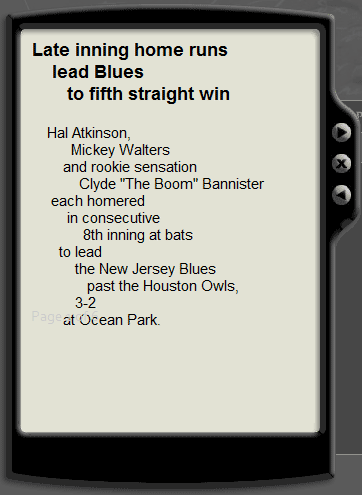
Bob Pritchett from Logos Bible Software points to Live Ink, a technology that takes normally formatted text and breaks its clauses into lines to improve reading comprehension. It looks like this:

A sports report is broken into lines: Hal Atkinson, / Mickey Walters / and rookie sensation…

Having been an English major, I keep trying to assign meaning to the line breaks—you pay close attention to line breaks when explicating poetry, and it’s hard to stop noticing them everywhere once you start noticing them in poetry. Live Ink has research to back up their reading claims; I’m not one to question their findings. So maybe I’m an anomaly, but studying the Bible in a similar format would distract me.

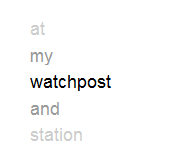
Speaking of things that distract me, a few years ago I came across an example (now lost on the hard drive of a deceased computer) of an interesting way of reading the Bible: one word at a time. The program cycles through the text of the Bible, showing you only one word on the screen—blink and you miss it. This Flashconverted to HTML5 in 2016 demo I just whipped up gives you the general idea:

You may need to read this post outside an RSS reader to see the demo. Not inclined? Here’s a screenshot. Picture the words rapidly scrolling upward:

The words “at my watchpost and station” are visible, with “watchpost” being the most prominent.

Honestly, I can’t decide if it’s a good idea or a bad one. The hardest part for me is that it requires more sustained concentration than I usually devote to reading. It might be useful if someone could come up with an intuitive way to control the speed and allow time to blink. Like Live Ink, it may simply take some getting used to.

(The way the demo scrolls kind of reminds me of William Shatner’s line delivery in Star Trek—it pauses slightly on longer words, which was apparently the key to Shatner’s acting in the 1960s. Actually, the line breaks in the Live Ink screenshot above remind me of how he would read a box score, too. Maybe he was just ahead of his time.)

Posted in Reading, Technology

The Tomb of Herod: Coordinates

As you may have heard, an archaeologist has announced the possible discovery of King Herod’s tomb at Herodium, Israel.

When people announce archaeological discoveries, wouldn’t it be helpful if newspapers printed the coordinates of the discovery so you can look at the site in Google Earth? I think it would, so here they are: 31.666334N, 35.242072E

Someone created a KMZ for Google Earth (also see the forum post).

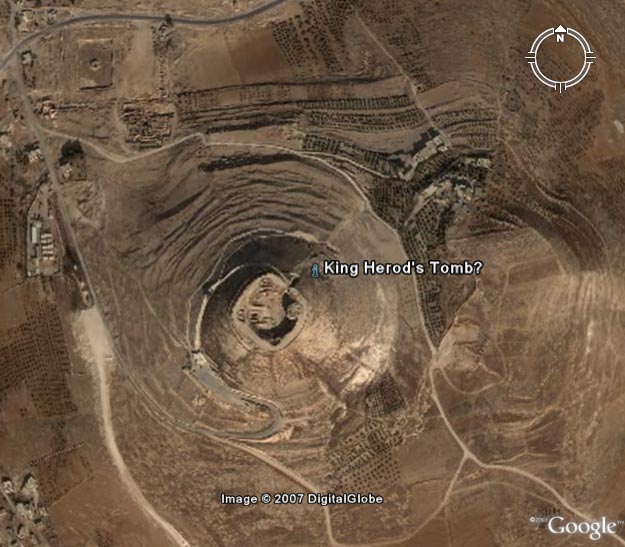
Here’s a detailed Google Earth image of the site:

Satellite image of Herodium showing the possible location of King Herod’s tomb on the northeast slope. Image copyright Google.

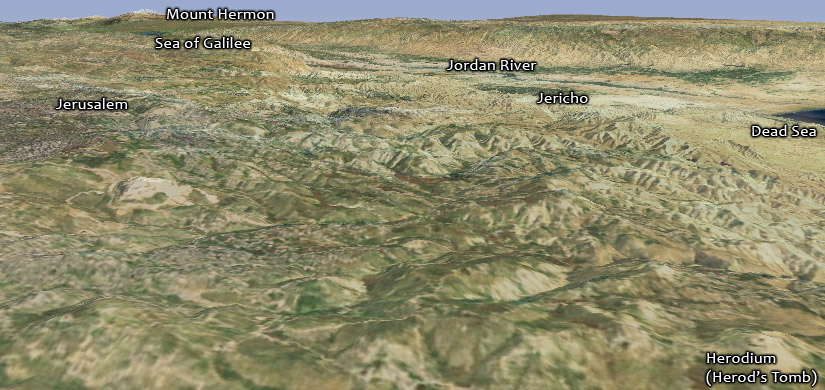
Here’s Herodium in a wider context (looking northeast). Jerusalem is about eight miles (13 km) north of Herodium.

View of Herodium showing the Dead Sea, Jericho, the Jordan River, the Sea of Galilee, Mount Hermon, and Jerusalem.

Posted in Geo

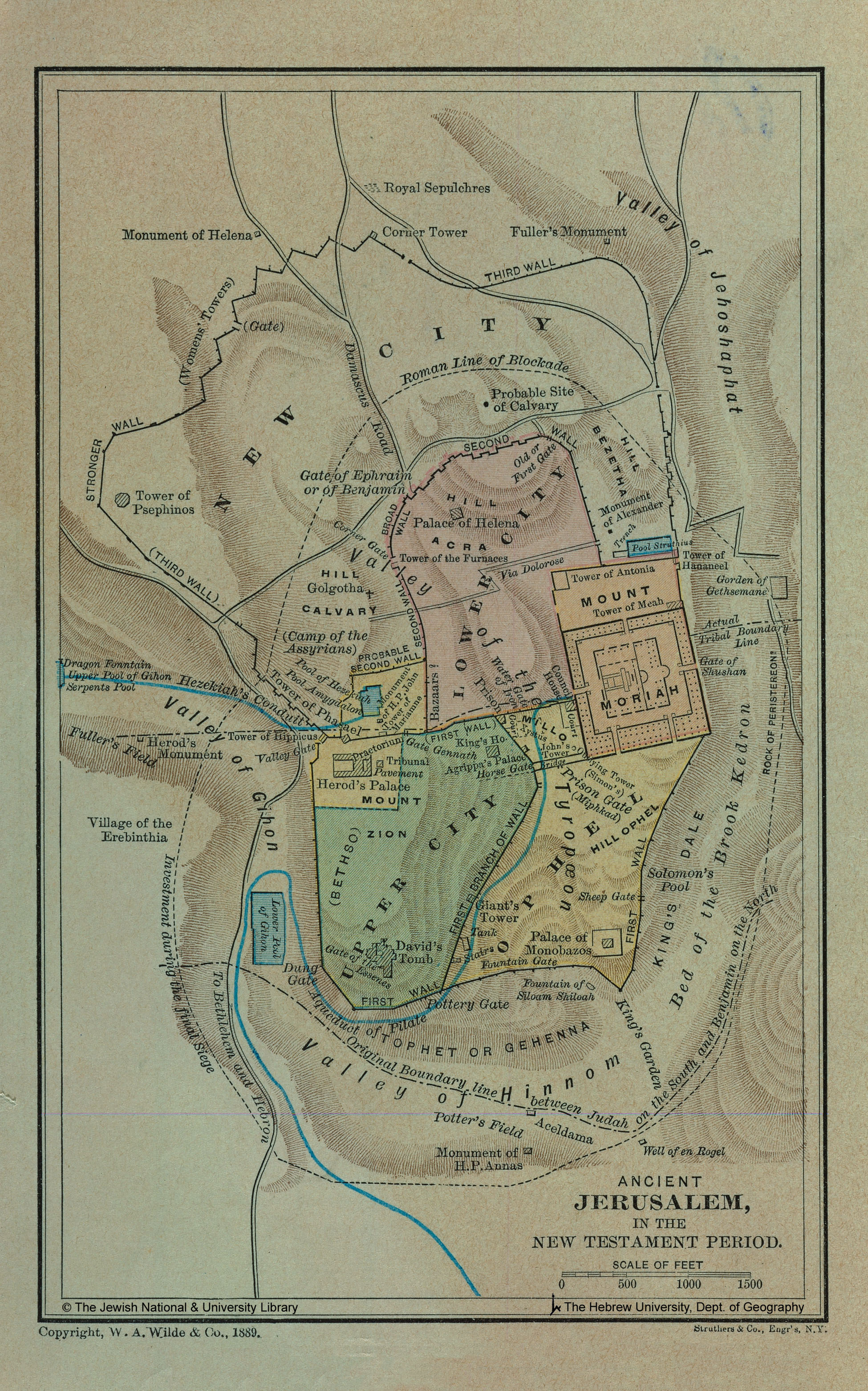
Three New Jerusalem Overlays

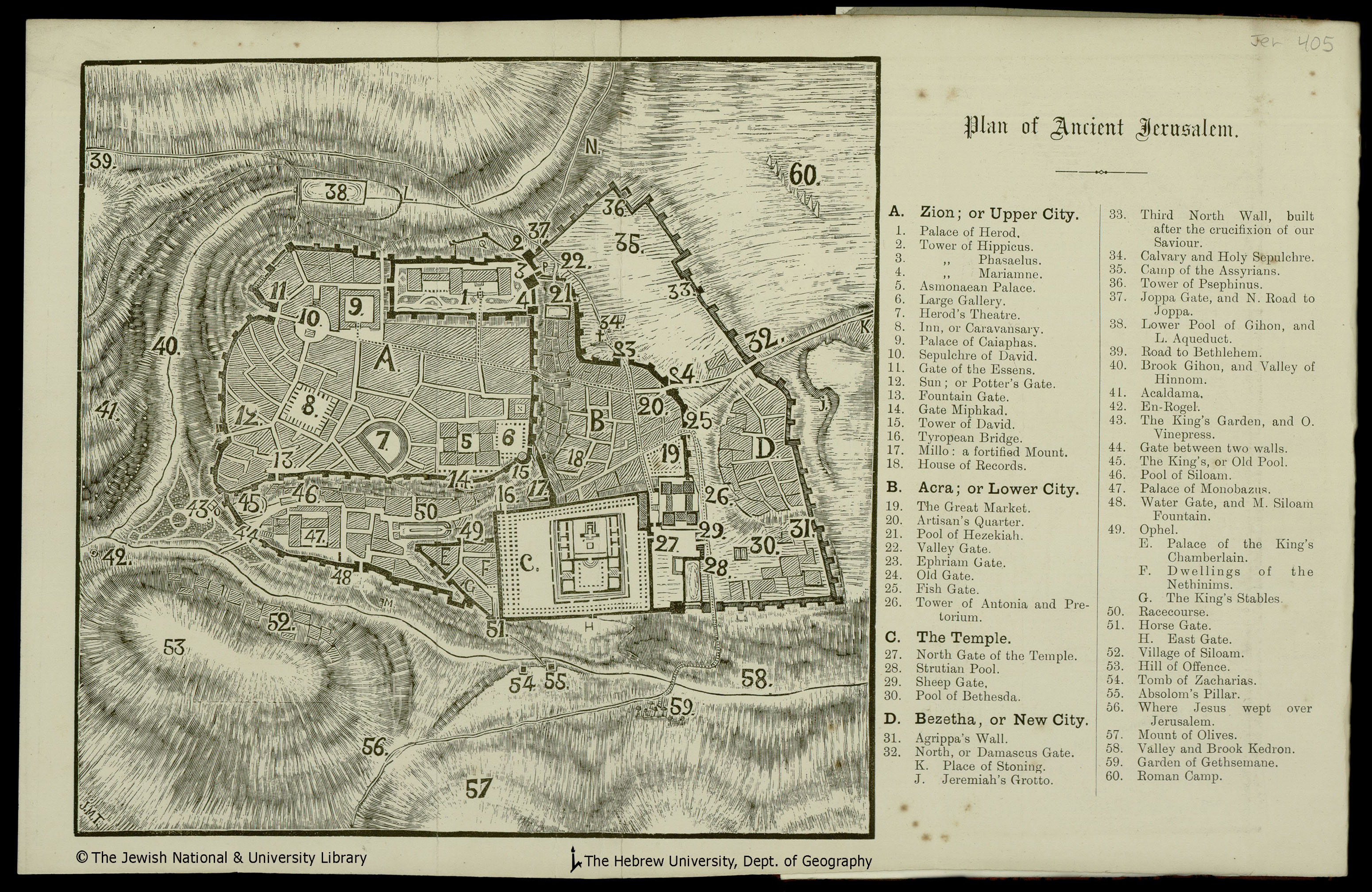
As previously hinted, the Jerusalem maps KML file (preview) now has three more overlays:

Conder (1876) Tenz (1894) Wilde (1889)

Thanks to The Jewish National & University Library, Shapell Family Digitization Project, Eran Laor Cartographic Collection and The Hebrew University of Jerusalem, Dept. of Geography, Historic Cities Project, for permission to use these images. Their website is full of historical maps of Jerusalem if you want to explore more of Jerusalem or create your own overlays.

Posted in Geo

Biblical Bodies of Water KML Update

The KML of water bodies in the Bible now includes outlines of nearly all the rivers, lakes, and seas the Bible mentions. Surprisingly, there aren’t that many.

Only a few water bodies remain: most notably, the Mediterranean, Adriatic, and Red Seas. The KML is too big to preview in Google Maps, so here’s an image for you:

Satellite image showing most of the rivers and other water bodies mentioned in the Bible.

Here are the places in the KML:

Posted in Geo

Bible Atlas: Now Less Annoying

The entries in the Bible atlas now appear on individual alphabetical pages instead of all on one page. (Though the full version is still available.) The many images on the page made it slow to download even on broadband connections.

Go take a look.

Posted in Geo

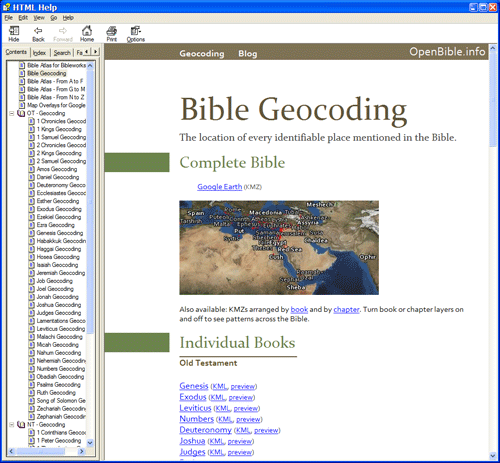
OpenBible on BibleWorks (Unofficially)

Pasquale on the BibleWorks forum has created a module that lets you browse the maps here directly from BibleWorks (though it helps if you have Google Earth installed). Download the file (35 MB .zip). The forum post has more instructions.

I don’t have BibleWorks; otherwise, I’d show you how it looks there. It’s an HTML Help file.

BibleWorks accepts regular HTML Help (.chm) files with some supporting metadata, so it looks like Pasquale created a local version of parts of this website. Nifty! You don’t even need BibleWorks to browse the file itself; any recent Windows computer should work fine. The only disadvantage to a local file, of course, is that it can’t include any new corrections that I make on the site.

I’m linking to a file hosted here here because the file linked on the forum is split into five pieces, which you have to download separately and reassemble. The above link is a simple .zip file.

Posted in Geo

Virtual Tours with Photosynth

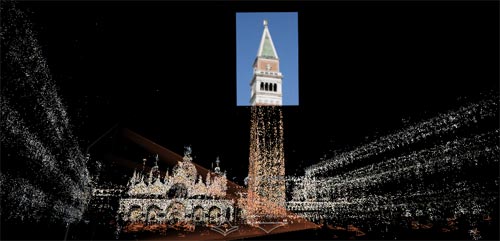
Photosynth is a Microsoft technology preview that creates 3D spaces from a bunch of photographs of the same place. Here’s a screenshot of the application in the space it’s constructed from dozens of photographs of the Piazza San Marco in Venice:

A 3D space showing a photograph of the tower with pointillistic representations of the rest of the piazza.

In the live application you can move around and highlight different photos taken from all sorts of angles. Check out the screencast if you’re hesitant about installing an ActiveX control on your computer.

I can see using this technology to reconstruct highly photographed places like Jerusalem in 3D. It’s not quite as good as building your own virtual-reality model of Jerusalem, but it’s a lot easier. Consider that flickr has about 9200 photos tagged “Jerusalem” under a Creative Commons license, and you can imagine the possibilities.

I look forward to being able to upload your own (or others’) photos and have the application create a space for you. Right now you can only use predefined photo collections.

Via Digital Media Minute.

Posted in Technology

New KML: Biblical Water Bodies

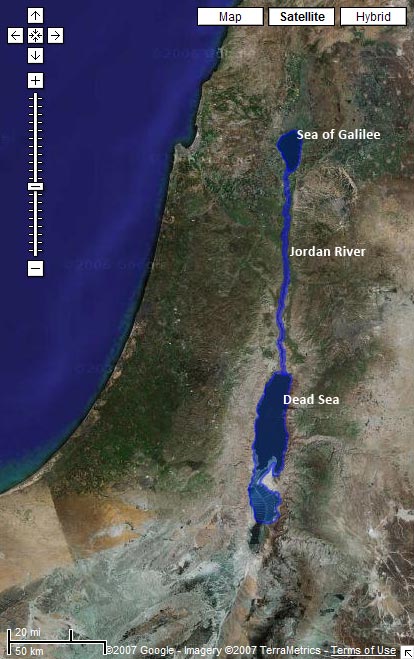
Download a KML with shapes for the Sea of Galilee, the Jordan River, and the Salt (Dead) Sea.

Preview it in Google Maps:

Satellite image from Google Maps with the Sea of Galilee, Jordan River, and Dead Sea highlighted

Limitations

The problem with water data is that water levels and paths fluctuate over time. The path in the KML for the Jordan River matches the current satellite data in Google Earth precisely, for example. But the river will change locations the next time Google updates its satellite imagery. And then I’ll either have to update the path to match the new imagery or live with the discrepancy. Of course, the current path of the Jordan only approximates the path it took in biblical times. So even if I update the file whenever Google gets new data, it still won’t accurately represent the historical context (which is impossible to reconstruct).

Even worse is the Dead Sea, which has dramatically shrunk over the past century as more fresh water gets diverted for human consumption. I tried to reconstruct the boundaries of the Dead Sea as it existed during the Bible, but the result is a disconnect between the satellite imagery and the shape file.

How I Made It

I made these outlines by tracing the satellite imagery in Google Earth using the Path and Polygon tools. It’s time-consuming, but you end up with a nice, accurate result. I’m surprised that no one’s done it before for some of these water bodies—at least, not that I could find.

Future Directions

I haven’t yet integrated the data with the rest of the KMLs because I’m not sure the best way to go about it. The main problem is that Google Earth doesn’t let you directly label a polygon or a path on the map. So while you can see the outline for the Sea of Galilee, you can’t know that that’s what it is. People often get around this limitation by creating a placemark inside a shape; I may end up doing that.

I hope to trace more bodies of water over time; I’ll be sure to blog about it when I do. This file represents my first attempts at creating polygons and paths in Google Earth. I wanted to try out some of the features I haven’t used yet. Reducing places to points on a map doesn’t always isn’t always the best way to represent them—some places cover large geographical areas, and shapes are useful in such situations.

Posted in Geo